
Download Device Cleanup Tool – Free, Secure, Portable Utility for Windows
Looking for a fast, secure, and hassle-free way to clean up leftover device entries on your Windows PC? Device Cleanup Tool is a lightweight, portable software developed by Uwe Sieber that helps you remove orphaned device entries in seconds. Whether you've unplugged a USB drive, external hard drive, or any peripheral device, this tool ensures no traces remain in your system’s device registry.
With support for multiple selection and last-use timestamp tracking, you can confidently clean up old or unused devices without risking system instability. The tool is completely free to download and use, requires no installation, and runs on all modern Windows systems. Ideal for both beginners and IT professionals, Device Cleanup Tool simplifies device management and keeps your system clutter-free.
You can launch it from a USB drive, making it perfect for troubleshooting or on-the-go cleanup tasks. No complex setup, no hidden fees—just instant access to a powerful cleanup utility.
Key Features of Device Cleanup Tool
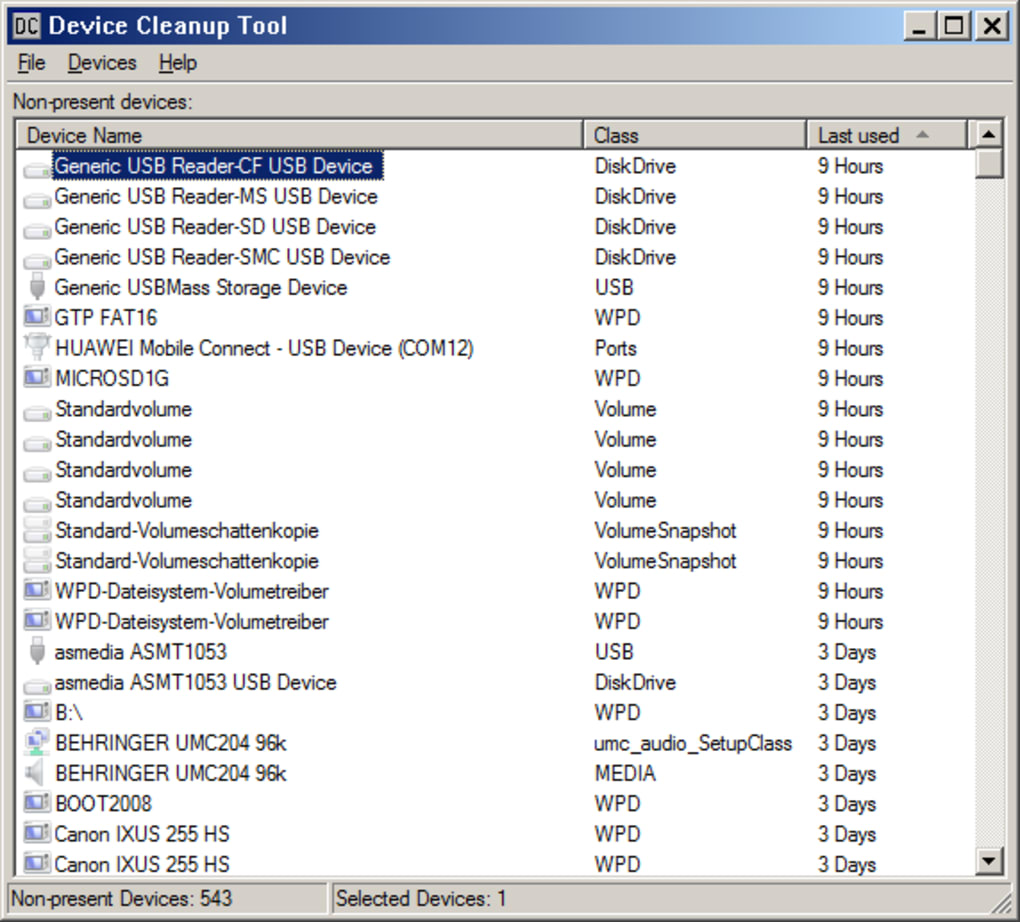
Device Cleanup Tool stands out in the crowded space of system utilities thanks to its focused, efficient design. Unlike bulky software that bloats your system, this tool does one thing exceptionally well: remove leftover device entries. The core feature is its ability to display all devices ever connected to your PC, including those that are no longer physically attached. Each entry includes the last time the device was used, giving you a clear signal about whether it’s safe to remove. This timestamp feature is especially useful when managing multiple USB drives or peripherals across different sessions.
Another standout feature is the ability to select and delete multiple device entries at once. Instead of going through each device individually, you can highlight several entries and remove them in a single click. This time-saving functionality is perfect for users who frequently swap devices or manage workstations with shared peripherals. The tool also integrates seamlessly with Windows’ device management system, ensuring that only the relevant registry entries are removed—no risk of deleting critical system components.
Being a portable application, Device Cleanup Tool doesn’t require installation. Simply download the executable file, run it, and start cleaning. It works on Windows 7, 8, 10, and 11 without needing admin rights for basic operation (though admin privileges are required to delete entries).
The interface is clean, minimal, and intuitive—no tutorials needed. Even users with limited technical knowledge can navigate it effortlessly. Plus, the tool is lightweight, consuming negligible system resources, so it won’t slow down your PC during use.
How to Install and Use Device Cleanup Tool
One of the biggest advantages of Device Cleanup Tool is its no-installation approach. There’s no need to run an installer or modify your system registry. To get started, simply visit the official download page, click the free download button, and save the executable file (usually named DeviceCleanupTool.exe) to your desired location—your desktop, a USB drive, or a dedicated folder.
Once downloaded, double-click the file to launch the application. If you’re using Windows 10 or 11, you might see a User Account Control (UAC) prompt. Click Yes to allow the tool to run with elevated privileges. This is necessary because removing device entries requires administrative access. After approval, the tool will scan your system and display a list of all previously connected devices, including their names, types, and the last usage date.
To clean up, select one or more entries from the list using the checkboxes. You can press Ctrl + A to select all, or use Ctrl + Click to pick specific devices. Once your selections are made, click the Remove Selected button. The tool will immediately delete the chosen entries from the system’s device registry. A confirmation message will appear once the cleanup is complete.
For added safety, it’s recommended to create a System Restore Point before using the tool, especially if you’re managing a critical system. This way, if any unexpected issues arise, you can revert to a previous state. The entire process takes less than a minute, making it ideal for quick maintenance tasks. After cleanup, you can close the tool—no leftover files or traces remain.
Compatibility and System Requirements
Device Cleanup Tool is designed specifically for the Windows operating system and is fully compatible with all major versions, including Windows 7, 8, 8.1, 10, and 11. It supports both 32-bit and 64-bit architectures, ensuring broad accessibility across different hardware setups. The software is lightweight and doesn’t require high-end system specs—just a standard Windows PC with a few megabytes of free disk space.
Since it’s a portable application, you can run it from any storage device, including USB flash drives, external hard drives, or even network drives. This makes it an excellent tool for IT technicians who need to troubleshoot multiple machines without installing software. It’s also ideal for users who prefer to keep their personal tools on a portable drive for privacy and convenience.
The tool does not rely on external libraries or frameworks, so there’s no need to install .NET Framework or other runtime environments. It’s a standalone executable, which enhances its reliability and reduces the risk of conflicts. Additionally, because it runs without installation, it won’t leave behind temporary files, logs, or registry entries—ensuring a truly clean footprint.
Pros and Cons of Device Cleanup Tool
- Pros:
- Free to download and use with no restrictions
- Portable—no installation required
- Supports bulk deletion of multiple device entries
- Displays last-used timestamps for safe removal
- Lightweight and fast—minimal system resource usage
- Perfect for IT professionals and casual users
- Runs from USB drives for on-the-go cleanup
- Cons:
- Requires administrator privileges to delete entries
- Only available for Windows (no Mac or Linux support)
- No built-in backup or undo feature
- Interface is minimal—no advanced customization options
- Only removes device registry entries, not data from the device itself
Frequently Asked Questions (FAQ)
-
Is Device Cleanup Tool safe to use?
Yes, Device Cleanup Tool is safe when used correctly. It only removes orphaned device registry entries, not system files or data from your devices. However, always create a System Restore Point before use to ensure you can revert if needed.
-
Do I need admin rights to run this tool?
The tool can be launched without admin rights, but you’ll need elevated privileges to delete device entries. If you don’t have admin access, the delete function will be disabled.
-
Can I use this tool on Mac or Linux?
No, Device Cleanup Tool is designed exclusively for Windows operating systems. There are no versions available for macOS or Linux.
-
Does it delete data from my USB drive?
No, the tool only removes device registry entries from your system. It does not erase or modify any data stored on your USB drives or external devices.
-
How often should I clean up device entries?
You can run Device Cleanup Tool whenever you notice clutter or after removing multiple devices. It’s safe to use regularly, especially if you frequently connect and disconnect peripherals.
Final Verdict and Call to Action
Device Cleanup Tool is a reliable, efficient, and secure utility for anyone looking to maintain a clean and organized Windows system. Its ability to remove leftover device entries in seconds—with the added benefit of multiple selection and last-use tracking—makes it a must-have for both casual users and IT professionals. The fact that it’s free, portable, and requires no installation sets it apart from many other system tools.
While it lacks advanced features like backups or undo options, its simplicity is its strength. It does exactly what it promises: clean up device traces without complications. If you’re tired of seeing old USB drives or external devices in your system’s device list, this tool is the perfect solution.
Download Device Cleanup Tool today and enjoy a faster, cleaner Windows experience—no installation, no hassle, just instant results.







